<?xml version="1.0" encoding="utf-8"?><feed xmlns="http://www.w3.org/2005/Atom" ><generator uri="https://jekyllrb.com/" version="3.10.0">Jekyll</generator><link href="https://www.alexhagiopol.com/feed.xml" rel="self" type="application/atom+xml" /><link href="https://www.alexhagiopol.com/" rel="alternate" type="text/html" /><updated>2026-05-17T08:12:16+00:00</updated><id>https://www.alexhagiopol.com/feed.xml</id><title type="html">Alex Hagiopol</title><subtitle>Personal website code forked from academicpages.github.io.</subtitle><author><name>{&quot;avatar&quot;=&gt;&quot;profile.jpg&quot;, &quot;location&quot;=&gt;&quot;San Francisco, CA&quot;, &quot;email&quot;=&gt;&quot;recruit.alex.h@icloud.com&quot;}</name><email>recruit.alex.h@icloud.com</email></author><entry><title type="html">Python Bindings for Performance Optimization: A Zero to One Guide</title><link href="https://www.alexhagiopol.com/posts/2023/01/python-bindings/" rel="alternate" type="text/html" title="Python Bindings for Performance Optimization: A Zero to One Guide" /><published>2023-01-22T00:00:00+00:00</published><updated>2023-01-22T00:00:00+00:00</updated><id>https://www.alexhagiopol.com/posts/2023/01/python-bindings-zero-to-one</id><content type="html" xml:base="https://www.alexhagiopol.com/posts/2023/01/python-bindings/"><![CDATA[<p>This article describes techniques to accelerate a Python codebase by exposing parallelized C++ functions using PyBind. It then analyzes the results of the optimization in which parallelizing one 40-line function in a 700-line program yielded up to a 3X end-to-end speedup.</p>

<h2 id="introduction">Introduction:</h2>
<p>I accelerate <a href="https://github.com/alexhagiopol/gmm" target="_blank">an existing Python codebase</a> while avoiding a full rewrite to keep the interface, visualization system, and data formats in tact. First I use <a href="https://docs.python.org/3/library/profile.html#module-cProfile" target="_blank">cProfile</a> to determine the function that consumes the most compute time. Next I implement a parallelized mathematical equivalent of the bottleneck function using concurrency facilities in <a href="https://cplusplus.com/reference/thread/thread/" target="_blank">modern C++</a> and achieve intra-process concurrency. I write a script to compile and test this function into a Python-importable module using <a href="https://github.com/pybind/pybind11" target="_blank">PyBind</a>. I then modify the original Python codebase to import and call the C++ function when requested from the command line. Lastly I measure an up to 3X performance improvement and provide observations.</p>

<h2 id="initial-execution">Initial Execution:</h2>
<p>The <a href="https://github.com/alexhagiopol/gmm" target="_blank">Python codebase</a> we want to accelerate is an estimator for Gaussian Mixture Models (GMM). I’m interested most in the heart of the algorithm itself. The visualization system is useful for research purposes, but for production purposes it does not need to run. For that reason, I start by running the following command line which disables visualization and executes only the mathematical implementation of the estimator:</p>

<div class="language-plaintext highlighter-rouge"><div class="highlight"><pre class="highlight"><code>time python3 gmm_segmentation.py --first-image=example_data/church.jpg --components=3 --iterations=8 --visualization=0 --precompiled-num-threads=0
</code></pre></div></div>

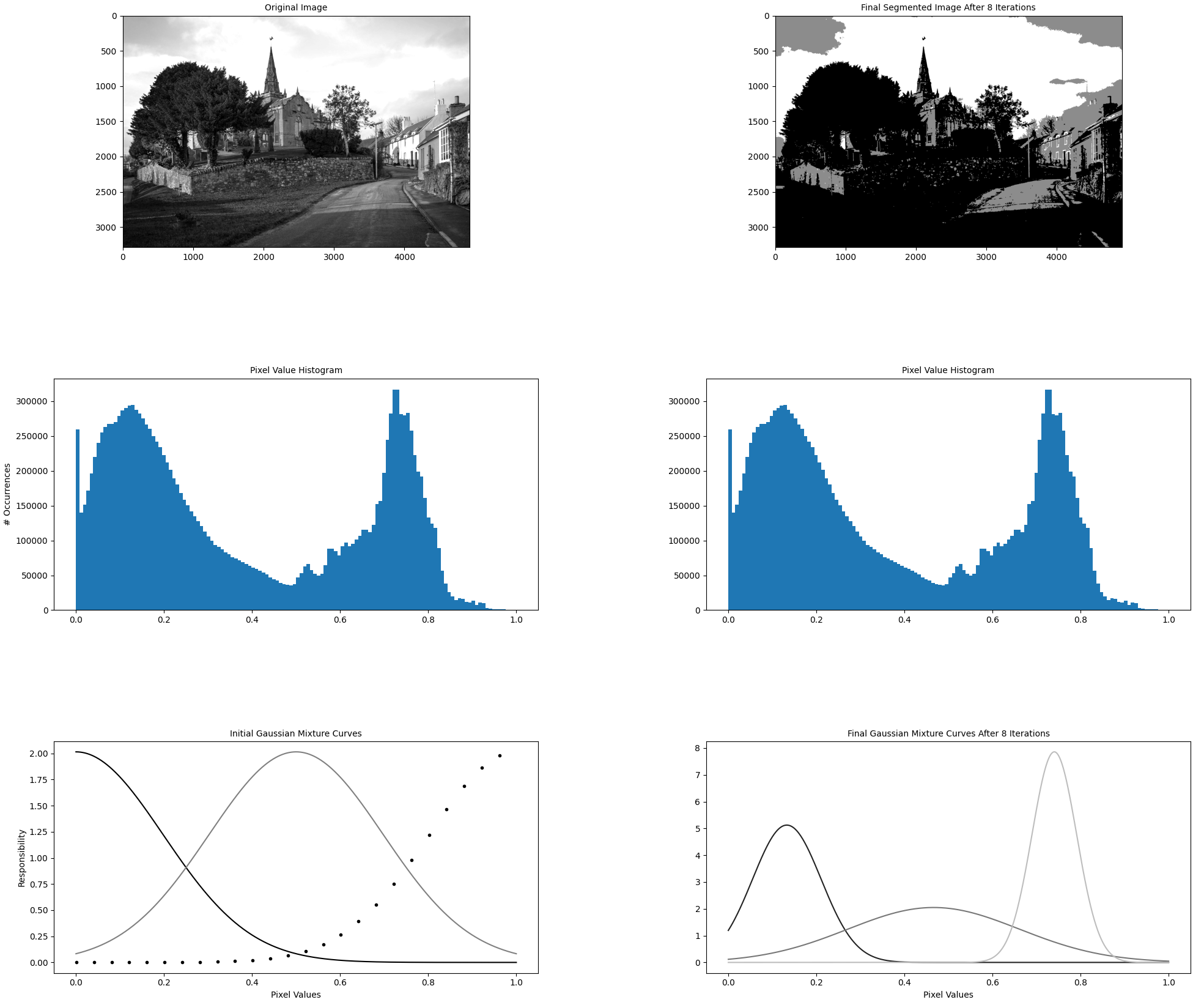
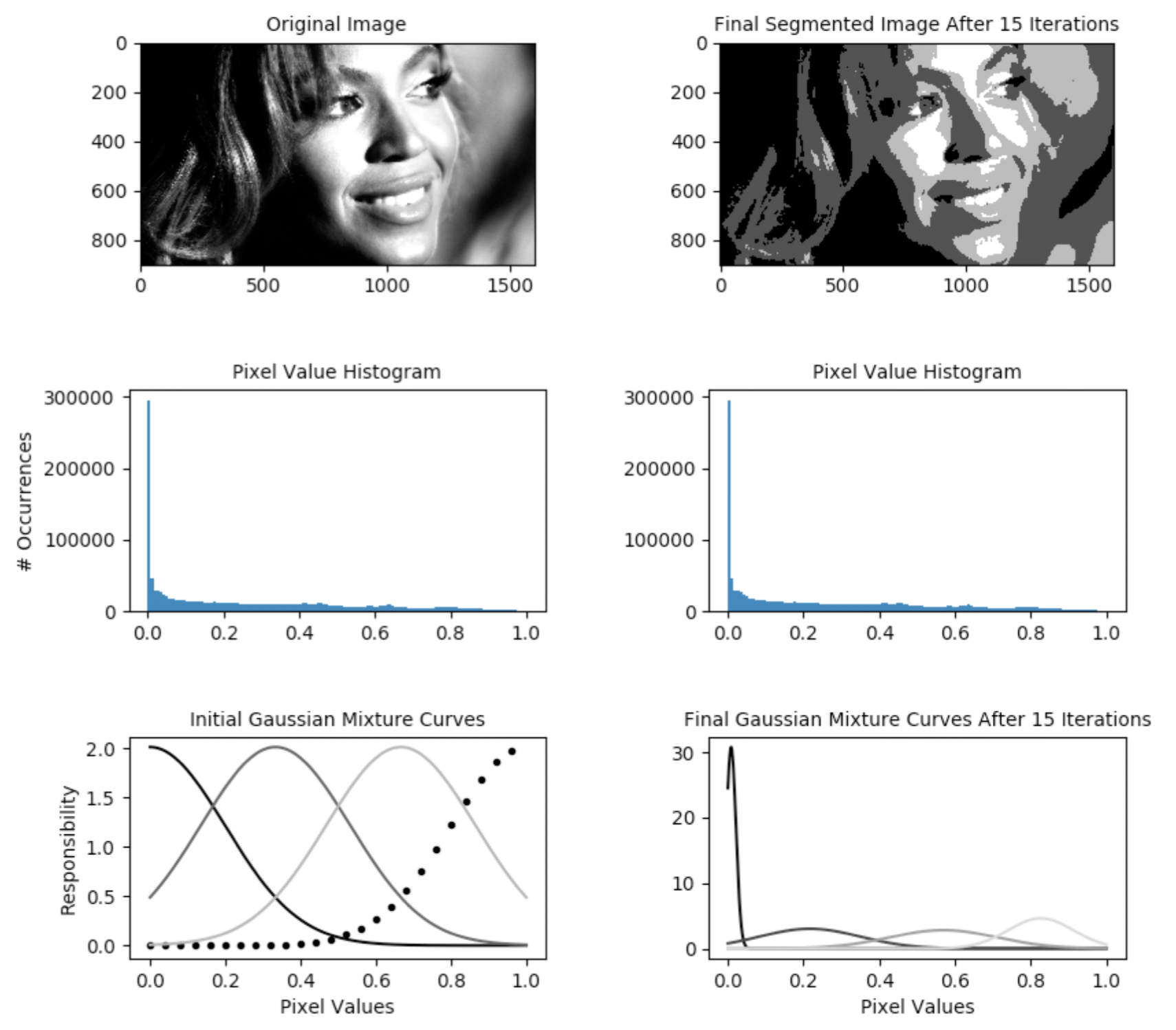
<p>The driver function of the codebase is in the file <a href="https://github.com/alexhagiopol/gmm/blob/master/gmm_segmentation.py" target="_blank"><code class="language-plaintext highlighter-rouge">gmm_segmentation.py</code></a> which is where our efforts will go. <code class="language-plaintext highlighter-rouge">--first-image</code> specifies the location on disk that contains the image for which we want to compute a GMM. We will keep it constant. The algorithm hyperparameters <code class="language-plaintext highlighter-rouge">--components</code> and <code class="language-plaintext highlighter-rouge">--iterations</code> are hand-selected and not relevant for this article. While they do influence algorithm runtime (runtime increases as the number of components and iterations increases), we will keep them constant at all times. As discussed, <code class="language-plaintext highlighter-rouge">--visualization</code> toggles the visualization capability which outputs figures explaining the algorithm state as shown below. <code class="language-plaintext highlighter-rouge">--precompiled-num-threads</code> toggles the use of the accelerated C++ function. We will start with this parameter set to <em>0</em> meaning we run only the original Python implementation.</p>

<p><img src="/content/gmm_figure_2.png" alt="GMM Figure 2" /></p>

<h2 id="observations-upon-initial-profiling">Observations upon Initial Profiling:</h2>
<p>I insert cProfile calls inside the <a href="https://github.com/alexhagiopol/gmm/blob/ad23397e9da736799be6ecccc24719ac84fb8af9/gmm_segmentation.py#L318" target="_blank">main()</a> function of <code class="language-plaintext highlighter-rouge">gmm_segmentation.py</code>. The profiling capability is compact requiring only two lines to construct and enable the profiler before the business logic gets executed and 5 lines to summarize and display the results afterward. The function calls <code class="language-plaintext highlighter-rouge">initialize_expectation_maximization()</code> and <code class="language-plaintext highlighter-rouge">execute_expectation_maximization()</code> contain all of the logic we want to profile.</p>

<p>Upon executing the command line in the previous section on an AMD 3975WX CPU, we see the following (abridged) output:</p>
<div class="language-plaintext highlighter-rouge"><div class="highlight"><pre class="highlight"><code>   ncalls  tottime  percall  cumtime  percall filename:lineno(function)
       16   12.900    0.806   36.050    2.253 /home/a/gmm/gmm_segmentation.py:109(compute_expsum_stable)
      241    8.690    0.036    8.690    0.036 {method 'reduce' of 'numpy.ufunc' objects}
       48    5.702    0.119    5.702    0.119 /home/a/.local/lib/python3.10/site-packages/scipy/stats/_continuous_distns.py:289(_norm_pdf)
        8    4.791    0.599   22.844    2.856 /home/a/gmm/gmm_segmentation.py:176(compute_expectation_responsibilities)
       48    4.131    0.086   15.788    0.329 /home/a/.local/lib/python3.10/site-packages/scipy/stats/_distn_infrastructure.py:2060(pdf)
       48    3.042    0.063    3.042    0.063 {built-in method numpy.core._multiarray_umath._insert}
        1    2.623    2.623   44.719   44.719 /home/a/gmm/gmm_segmentation.py:209(execute_expectation_maximization)

real	0m45.572s
user	0m37.171s
sys	0m18.049s
</code></pre></div></div>

<p>The profiler recursively measures the time consumed by the functions that get called between the <code class="language-plaintext highlighter-rouge">profiler.enable()</code> and <code class="language-plaintext highlighter-rouge">profiler.disable()</code> calls. The functions are displayed in decreasing order of compute time consumed. Due to recursive operation, if <code class="language-plaintext highlighter-rouge">functionA()</code> internally calls <code class="language-plaintext highlighter-rouge">functionB()</code>, time spent in both functions is considered in the profiler ranking even though the profiler is only enabled and disabled once.</p>

<p>We see that the hottest function is <a href="https://github.com/alexhagiopol/gmm/blob/b7a833e78dc53634de04dc3b9d591fdd8078c28f/gmm_segmentation.py#L109" target="_blank"><code class="language-plaintext highlighter-rouge">compute_expsum_stable()</code></a> in <code class="language-plaintext highlighter-rouge">gmm_segmentation.py</code>. Along with NumPy operators, we see also that <code class="language-plaintext highlighter-rouge">compute_expsum_stable()</code> calls a SciPy function, <code class="language-plaintext highlighter-rouge">scipy/stats/_continuous_distns.py:289(_norm_pdf)</code> (a.k.a <code class="language-plaintext highlighter-rouge">scipy.stats.norm.pdf()</code> in the actual code), which is listed as the third hottest. Therefore I decide to re-implement <code class="language-plaintext highlighter-rouge">compute_expsum_stable()</code> in C++ with hopes of increasing its performance.</p>

<h2 id="implementing-compiling-and-importing-a-custom-c-module">Implementing, Compiling, and Importing a Custom C++ Module</h2>

<p><em>NB: To illustrate this without the complexity of the GMM codebase, I made a separate and compact repo <a href="https://github.com/alexhagiopol/pybind_examples" target="_blank">https://github.com/alexhagiopol/pybind_examples</a> with no other purpose.</em></p>

<p>A multithreaded C++ equivalent of <code class="language-plaintext highlighter-rouge">compute_expsum_stable()</code> is implemented in <a href="https://github.com/alexhagiopol/gmm/blob/b7a833e78dc53634de04dc3b9d591fdd8078c28f/PrecompiledFunctions.cpp#L68" target="_blank"><code class="language-plaintext highlighter-rouge">computeExpsumStable()</code></a> in <code class="language-plaintext highlighter-rouge">PrecompiledFunctions.cpp</code>. The re-implemented function is mathematically equivalent to the Python original and calls no external math functions other than basic matrix element access operators from the Eigen library. If using only a single thread, I expected the C++ function to underperform the Python version because the C++ function (a) naively re-implements SciPy’s <code class="language-plaintext highlighter-rouge">scipy.stats.norm.pdf()</code> without care for memory alignment or other lower level optimizations, (b) the original Python code uses vectorized syntax, and (c) the large 3D matrix <code class="language-plaintext highlighter-rouge">P</code> must be copied twice when calling the C++ function due to Eigen’s lack of official support for 3D matrices.</p>

<p>To compile the C++ code, the <a href="https://github.com/alexhagiopol/gmm/blob/master/CMakeLists.txt" target="_blank"><code class="language-plaintext highlighter-rouge">CMakeLists.txt</code></a> file defines the build procedure for the Python module <code class="language-plaintext highlighter-rouge">precompiled_functions</code> which will land in a build folder <code class="language-plaintext highlighter-rouge">precompiled_functions_build</code>. The file re-uses PyBind’s own CMake module generation function. The Python script <a href="https://github.com/alexhagiopol/gmm/blob/master/build_precompiled_functions.py" target="_blank">build_precompiled_functions.py</a> automates the build process from build folder generation, to CMake invocation, to binaries generation. The Python module is imported by <code class="language-plaintext highlighter-rouge">gmm_segmentation.py</code> in the <a href="https://github.com/alexhagiopol/gmm/blob/b7a833e78dc53634de04dc3b9d591fdd8078c28f/gmm_segmentation.py#L28" target="_blank">initialization of the <code class="language-plaintext highlighter-rouge">GMM_Estimator</code></a> object. The Python implementation of <a href="https://github.com/alexhagiopol/gmm/blob/b7a833e78dc53634de04dc3b9d591fdd8078c28f/gmm_segmentation.py#L109" target="_blank">compute_expsum_stable()</a> calls either a pure Python implementation or the imported C++ implementation depending on the user’s selection in the <code class="language-plaintext highlighter-rouge">--precompiled-num-threads</code> command line parameter. If set to <em>0</em>, the pure Python implementation of <code class="language-plaintext highlighter-rouge">compute_expsum_stable()</code> will run. If set to <em>1</em> or more, that many threads will be given to the C++ implementation instead.</p>

<h2 id="observations-upon-second-profiling">Observations upon Second Profiling:</h2>

<p>With a C++ equivalent of the hottest function implemented, we give it one thread and do a second profiling run to compare against the pure Python version:</p>

<div class="language-plaintext highlighter-rouge"><div class="highlight"><pre class="highlight"><code>time python3 gmm_segmentation.py --first-image=example_data/church.jpg --components=3 --iterations=8 --visualization=0 --precompiled-num-threads=1
</code></pre></div></div>

<p>results in the following (abridged) profiler ranking:</p>

<div class="language-plaintext highlighter-rouge"><div class="highlight"><pre class="highlight"><code>   ncalls  tottime  percall  cumtime  percall filename:lineno(function)
       16   25.568    1.598   25.568    1.598 {built-in method precompiled_functions_build.precompiled_functions.computeExpsumStable}
        8    4.878    0.610   19.853    2.482 /home/a/gmm/gmm_segmentation.py:176(compute_expectation_responsibilities)
       16    4.394    0.275   29.962    1.873 /home/a/gmm/gmm_segmentation.py:109(compute_expsum_stable)
        1    2.769    2.769   38.986   38.986 /home/a/gmm/gmm_segmentation.py:209(execute_expectation_maximization)
        8    0.891    0.111   15.928    1.991 /home/a/gmm/gmm_segmentation.py:157(compute_log_likelihood_stable)
      129    0.482    0.004    0.482    0.004 {method 'reduce' of 'numpy.ufunc' objects}

real	0m39.814s
user	0m34.286s
sys	0m15.183s
</code></pre></div></div>

<p>Some observations:</p>
<ol>
  <li>Despite not using more than a single thread, calling the C++ function has reduced the total time to execute the program from <strong>45.6s</strong> to <strong>39.8s</strong>. Already this is a positive result considering the aforementioned disadvantages of the C++ implementation.</li>
  <li>In the profiler ranking, we notice that the function <code class="language-plaintext highlighter-rouge">scipy/stats/_continuous_distns.py:289(_norm_pdf)</code> is no longer present as we expect. This is expected since <code class="language-plaintext highlighter-rouge">scipy.stats.norm.pdf()</code> is no longer called.</li>
  <li>The Python function <code class="language-plaintext highlighter-rouge">compute_expsum_stable</code> has been deranked and replaced by the C++ function <code class="language-plaintext highlighter-rouge">precompiled_functions.computeExpsumStable</code> which is also expected because the bulk of the work is now done in the C++ implementation.</li>
  <li>The number of <code class="language-plaintext highlighter-rouge">{method 'reduce' of 'numpy.ufunc' objects}</code> has been reduced from 241 to 129 and with a time cost reduced from 8.7s to 0.48s. This is also expected: the number of numpy operations required is reduced because the math is now implemented in C++.</li>
</ol>

<h2 id="observations-upon-third-profiling">Observations upon Third Profiling:</h2>

<p>Let’s see what happens when we let the 32-core &amp; 64-thread AMD 3975WX CPU stretch its legs and use more than one thread for the C++ function. We’ll look only at total program runtime in this section.</p>

<ol>
  <li>Single Python thread: <strong>45.6s</strong></li>
  <li>Single Python thread calling single-thread C++ function: <strong>39.8s</strong></li>
  <li>Single Python thread calling 4-thread C++ function: <strong>21.4s</strong></li>
  <li>Single Python thread calling 8-thread C++ function: <strong>18.3s</strong></li>
  <li>Single Python thread calling 8-thread C++ function: <strong>15.9s</strong></li>
  <li>Single Python thread calling 32-thread C++ function: <strong>15.8s</strong></li>
  <li>Single Python thread calling 64-thread C++ function: <strong>15.5s</strong></li>
</ol>

<p>The results are quite encouraging: by parallelizing only a single function with intra-process concurrency, we’ve yielded a close to 3X acceleration of the entire program. Looking at the profiler ranking for the 64-thread run, we see that the C++ function is so fast that’s it’s no longer top-ranked indicating that we would want to optimize other parts of the system next:</p>

<div class="language-plaintext highlighter-rouge"><div class="highlight"><pre class="highlight"><code>   ncalls  tottime  percall  cumtime  percall filename:lineno(function)
        8    4.881    0.610    8.033    1.004 /home/a/gmm/gmm_segmentation.py:176(compute_expectation_responsibilities)
       16    4.093    0.256    6.237    0.390 /home/a/gmm/gmm_segmentation.py:109(compute_expsum_stable)
        1    2.562    2.562   15.041   15.041 /home/a/gmm/gmm_segmentation.py:209(execute_expectation_maximization)
       16    2.143    0.134    2.143    0.134 {built-in method precompiled_functions_build.precompiled_functions.computeExpsumStable}
        8    0.867    0.108    4.001    0.500 /home/a/gmm/gmm_segmentation.py:157(compute_log_likelihood_stable)
</code></pre></div></div>

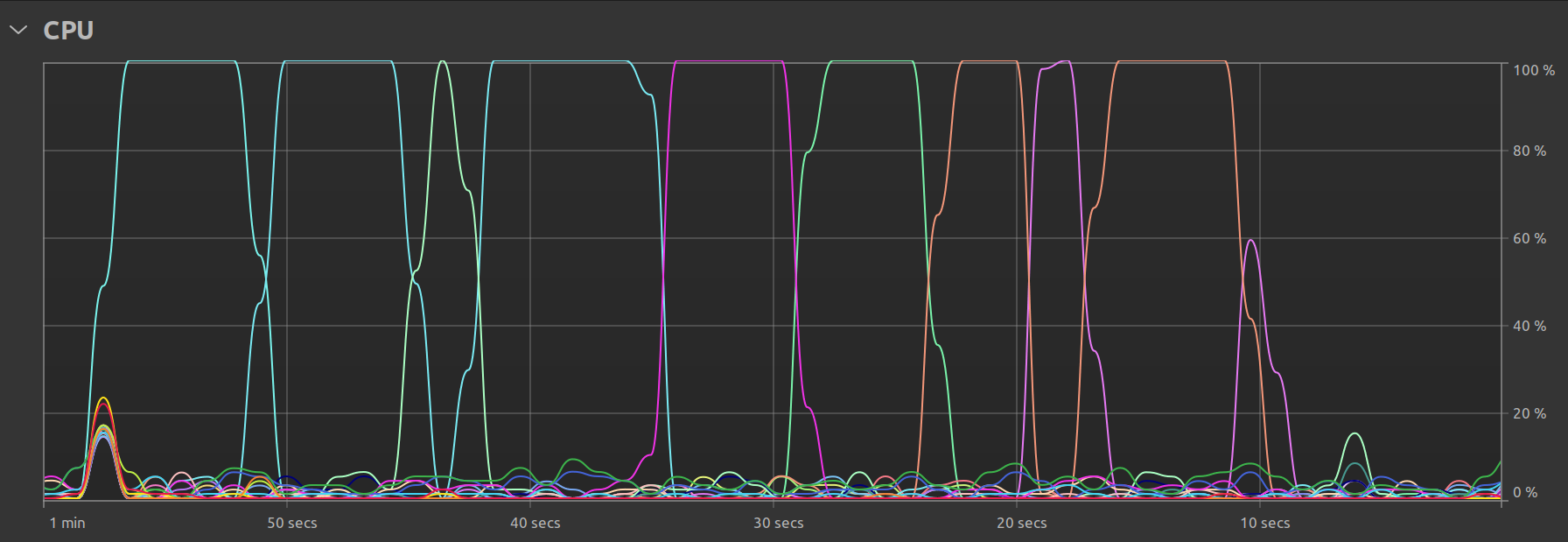
<p>One final observation is my Ubuntu system’s own resource utilization graph. In the single threaded case, we clearly see that there is some parallel activity at program startup, but the bulk of the time is spent with just one thread doing all the work:</p>

<p><img src="/content/gmm_single_thread.png" alt="GMM Figure 3" /></p>

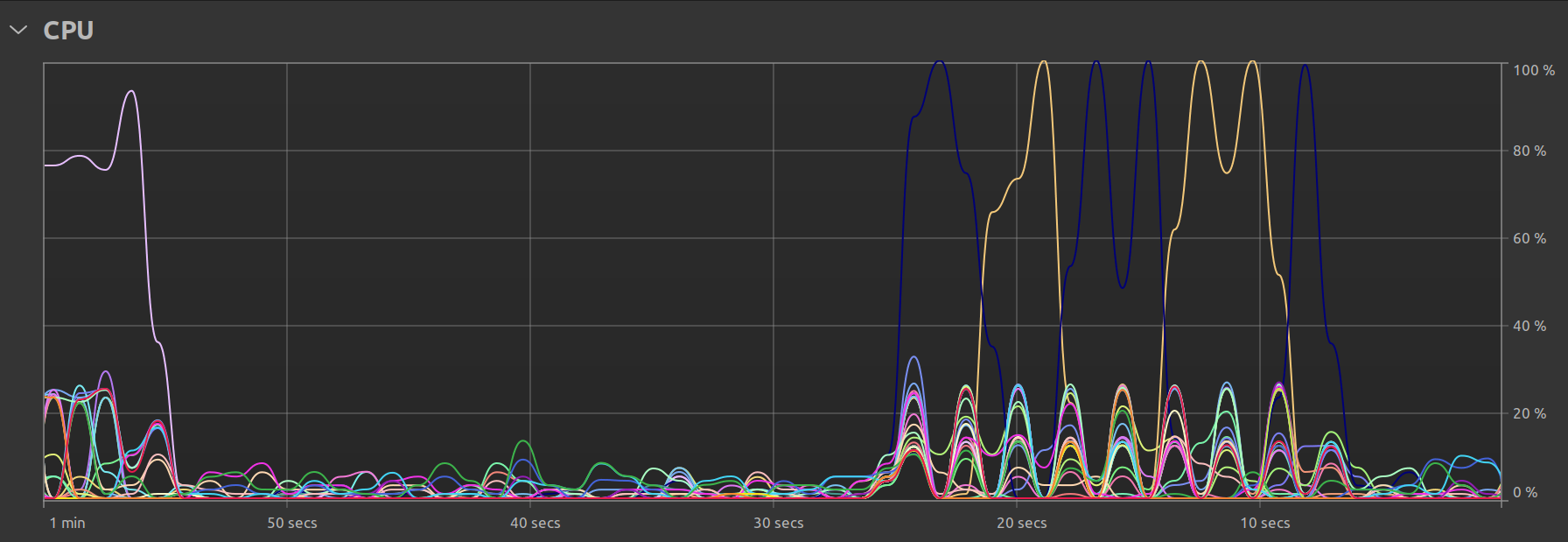
<p>In the multi-threaded case, we can see that there is still one main thread but that there exist smaller “peaks” representing the times when the remaining available threads are called upon to perform the work:</p>

<p><img src="/content/gmm_multi_thread.png" alt="GMM Figure 4" /></p>]]></content><author><name>{&quot;avatar&quot;=&gt;&quot;profile.jpg&quot;, &quot;location&quot;=&gt;&quot;San Francisco, CA&quot;, &quot;email&quot;=&gt;&quot;recruit.alex.h@icloud.com&quot;}</name><email>recruit.alex.h@icloud.com</email></author><category term="pybind" /><category term="python bindings" /><category term="modern C++" /><category term="concurrency" /><summary type="html"><![CDATA[This article describes techniques to accelerate a Python codebase by exposing parallelized C++ functions using PyBind. It then analyzes the results of the optimization in which parallelizing one 40-line function in a 700-line program yielded up to a 3X end-to-end speedup.]]></summary></entry><entry><title type="html">Segmentation For Holographic Images</title><link href="https://www.alexhagiopol.com/posts/2020/11/segmentation-for-holographic-images/" rel="alternate" type="text/html" title="Segmentation For Holographic Images" /><published>2020-11-26T00:00:00+00:00</published><updated>2020-11-26T00:00:00+00:00</updated><id>https://www.alexhagiopol.com/posts/2020/11/segmentation-for-holographic-images</id><content type="html" xml:base="https://www.alexhagiopol.com/posts/2020/11/segmentation-for-holographic-images/"><![CDATA[<p>Patent I authored while working at Microsoft. Describes an image segmentation technique for producing photorealistic human holograms.</p>

<h3 id="introduction">Introduction:</h3>

<p>My <a href="https://patents.google.com/patent/US10902608B2">2019 U.S. Patent, “Segmentation for Holographic Images”</a>
describes a method of 2D image segmentation that - when used as a precursor to 3D reconstruction algorithms - greatly 
improves resulting hologram photorealism relative to previously established prior art such as <a href="https://dl.acm.org/doi/abs/10.1145/2766945">this landmark 2015 paper by Collet et al</a>. 
The invention enhances augmented reality applications such as using human avatars for communication or preservation purposes. 
This technology was used by Microsoft’s <a href="https://www.microsoft.com/en-us/mixed-reality/capture-studios">Mixed Reality Capture Studios</a>.</p>

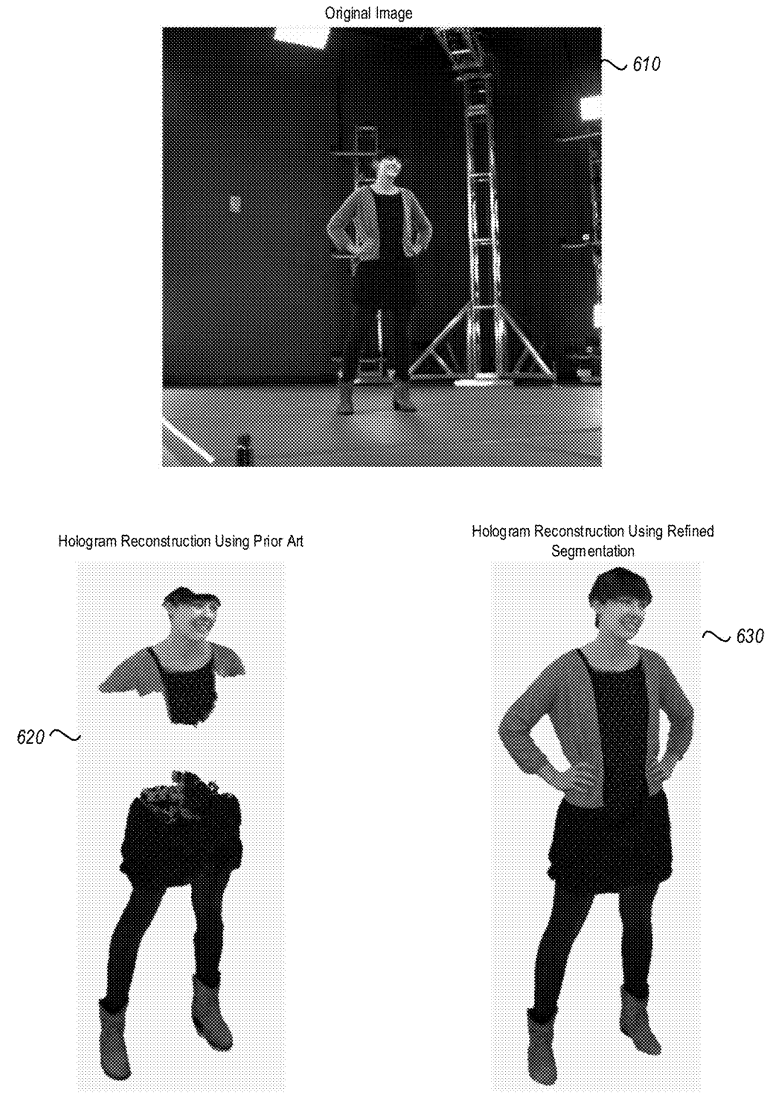
<p>The following image shows the improvement in human avatar quality achieved with the described approach:</p>

<p><img src="/content/patent_fig_6.png" alt="fig6" /></p>

<h3 id="summary">Summary:</h3>

<p>I summarize the patent here by reviewing the ideas illustrated in the figures:</p>

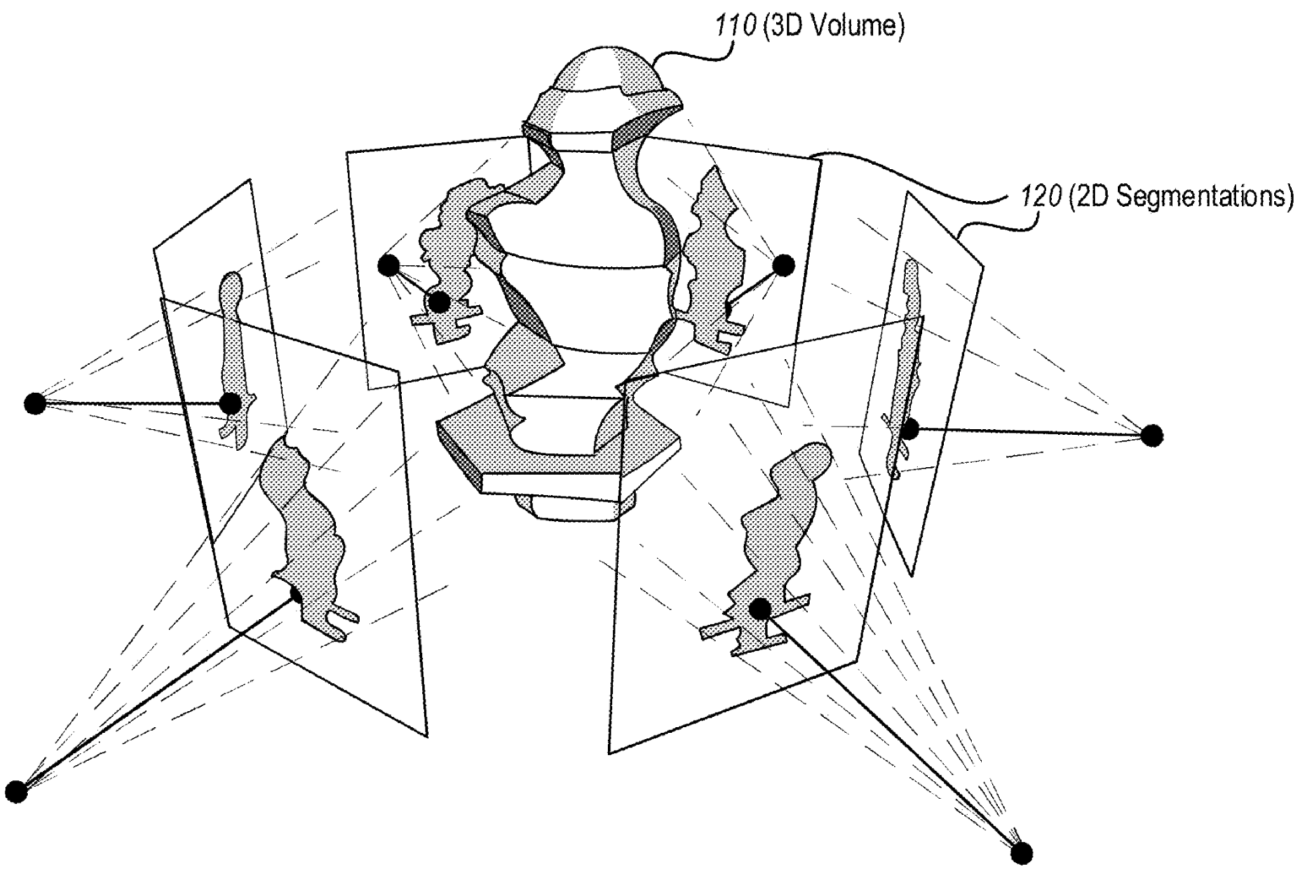
<p>Figure 1 describes the relationship between volumetric 3D reconstruction and the 2D images: a 3D volume 
can be calculated from many 2D silhouettes. Thus, to accurately reconstruct a 3D volume observed in 2D images, 
many accurate volume silhouettes must be first obtained in 2D.
<img src="/content/patent_fig_1.png" alt="fig1" /></p>

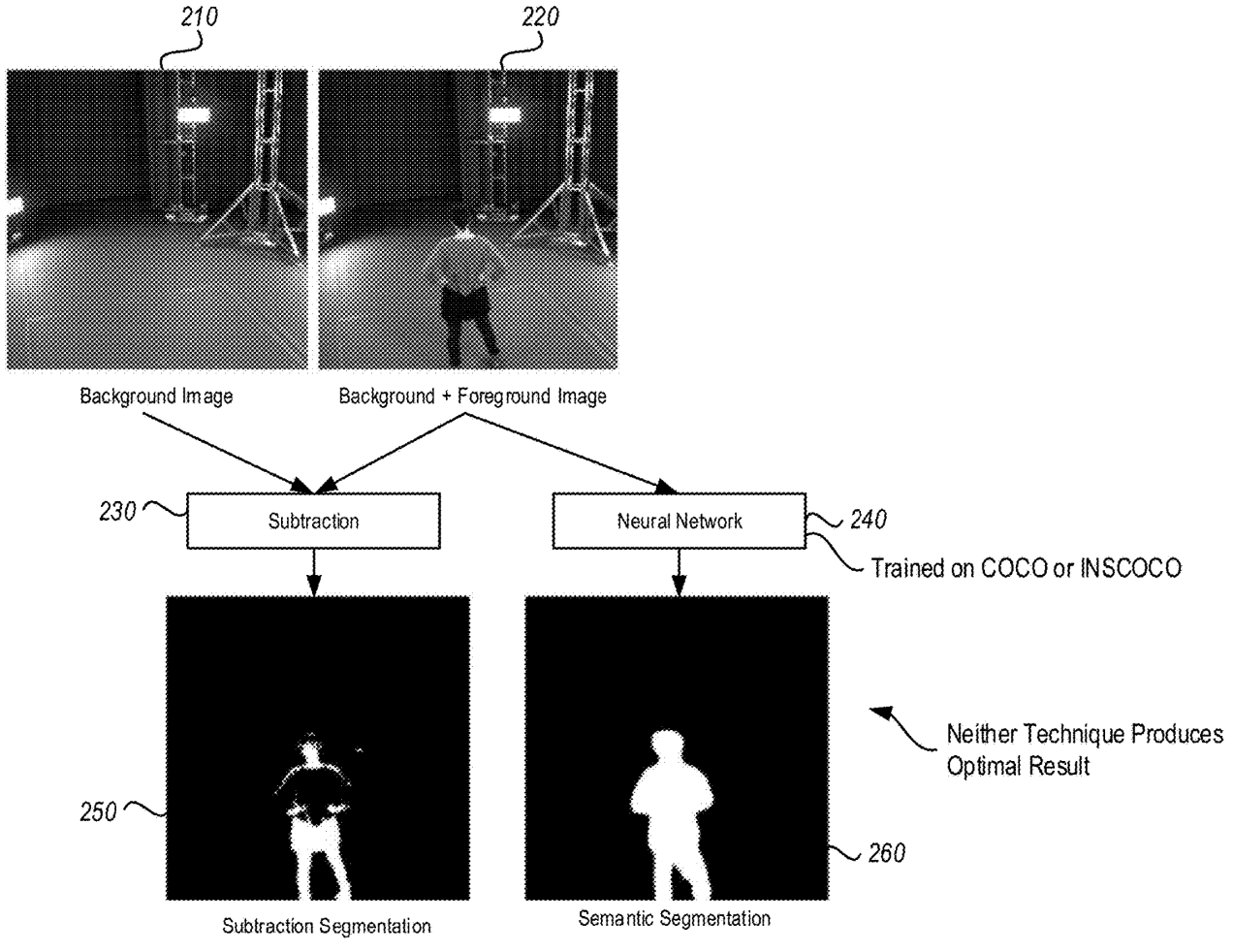
<p>Because humans are extremely good at identifying other humans, producing human holograms with
even slight volumetric errors is immersion-breaking for a consumer of augmented reality content. Figure 2
communicates that previous techniques used to obtain silhouettes were not sufficiently accurate for volumetric
hologram applications at the time of this patent’s writing. In the absence of extremely well-labeled and 
diverse training data, even neural networks did not produce silhouettes accurate enough for human hologram applications. 
Traditional segmentation techniques like background subtraction are also defeated when the RGB intensities of background
pixels are very similar to the RGB intensities of the target volume.
<img src="/content/patent_fig_2.png" alt="fig2" /></p>

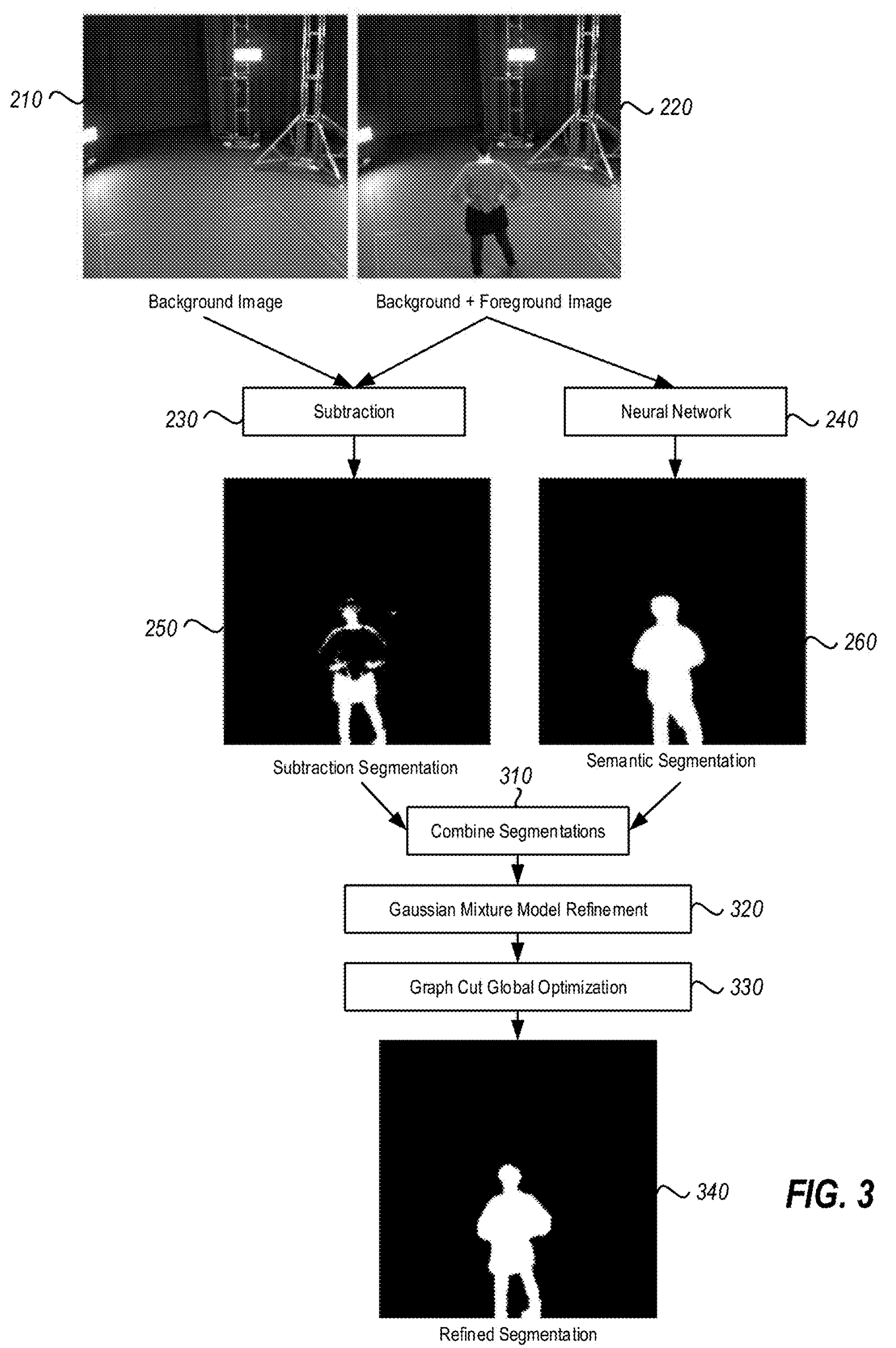
<p>Figure 3 describes the approach proposed in this patent: combining (1) foreground-background subtraction,
(2) neural network based semantic segmentation, and (3) statistical learning based postprocessing to produce 
highly refined silouettes for volumetric reconstruction.
<img src="/content/patent_fig_3.png" alt="fig3" /></p>

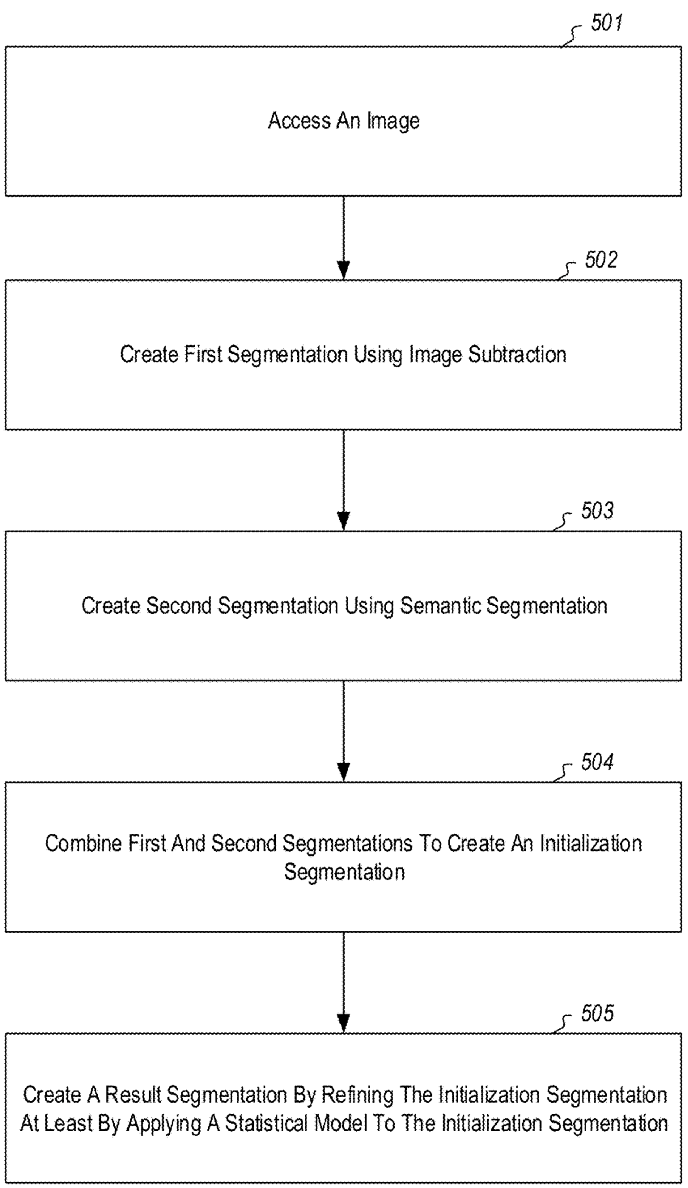
<p>Figure 5 outlines the algorithm pipeline proposed in this patent in text form:
<img src="/content/patent_fig_5.png" alt="fig5" /></p>

<p>Figure 6 shows the final payoff of the proposed approach in terms of hologram quality. The top image is an input to the hologram
reconstruction algorithm described <a href="https://dl.acm.org/doi/abs/10.1145/2766945" target="_blank">by Collet et al</a>. The lower left image 
is a view of the hologram that is produced with traditional silhouette calculation approaches. The lower right image
is a view of the hologram that is produced using the approach described in this patent. The improvement in reconstruction
quality is drastic.
<img src="/content/patent_fig_6.png" alt="fig6" /></p>]]></content><author><name>{&quot;avatar&quot;=&gt;&quot;profile.jpg&quot;, &quot;location&quot;=&gt;&quot;San Francisco, CA&quot;, &quot;email&quot;=&gt;&quot;recruit.alex.h@icloud.com&quot;}</name><email>recruit.alex.h@icloud.com</email></author><category term="computer vision" /><category term="3D reconstruction" /><category term="deep learning" /><category term="statistical learning" /><category term="semantic segmentation" /><category term="augmented reality" /><summary type="html"><![CDATA[Patent I authored while working at Microsoft. Describes an image segmentation technique for producing photorealistic human holograms.]]></summary></entry><entry><title type="html">Review of Dense Surface Reconstruction</title><link href="https://www.alexhagiopol.com/posts/2019/10/review-of-dense-surface-reconstruction/" rel="alternate" type="text/html" title="Review of Dense Surface Reconstruction" /><published>2019-10-08T00:00:00+00:00</published><updated>2019-10-08T00:00:00+00:00</updated><id>https://www.alexhagiopol.com/posts/2019/10/review-of-dense-surface-reconstruction</id><content type="html" xml:base="https://www.alexhagiopol.com/posts/2019/10/review-of-dense-surface-reconstruction/"><![CDATA[<p>Presentation slides for in-depth tech talk on dense 3D point cloud reconstruction from 2D images.</p>

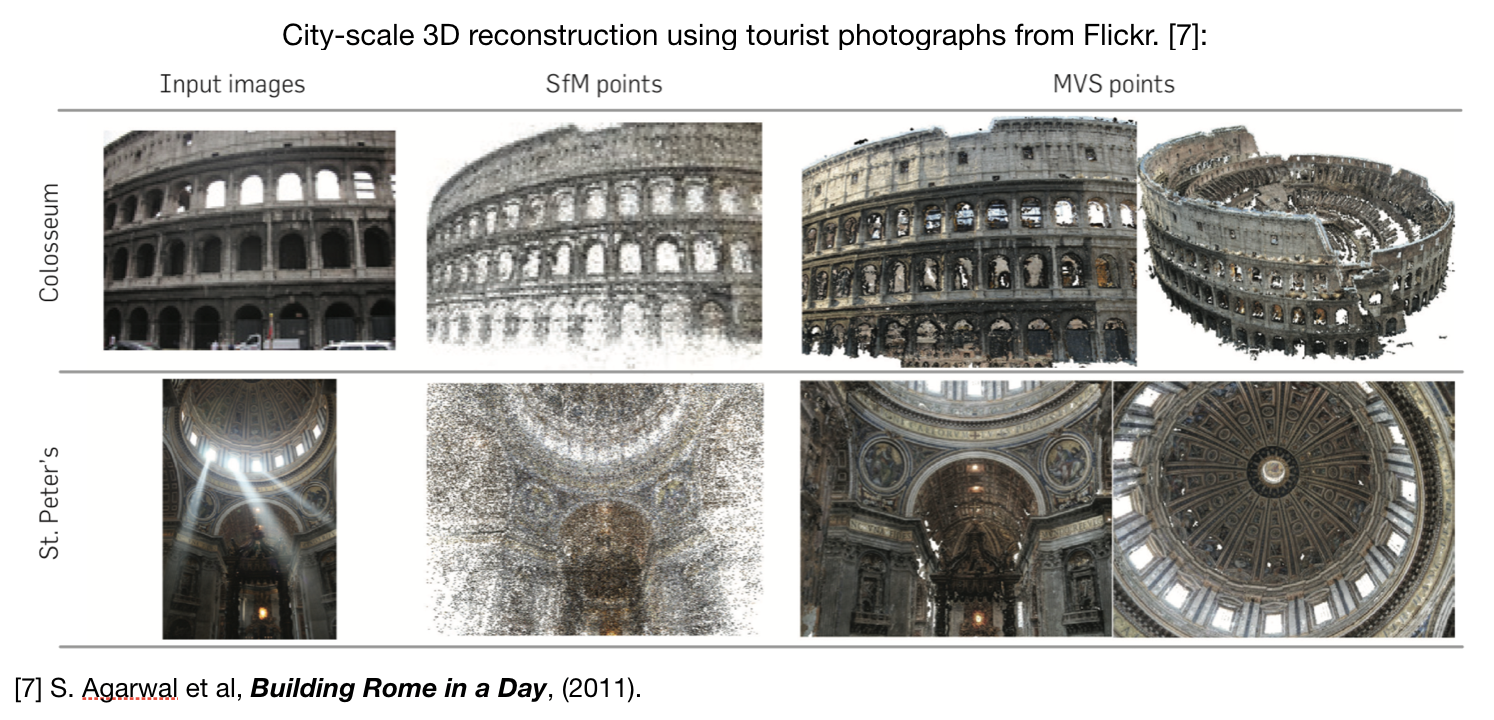
<h3 id="description">Description:</h3>

<p>This <a href="/content/dense-surface-reconstruction.pdf" target="_blank">PDF presentation</a> is a talk I have given at several venues that provides an overview of the topic of dense 3D surface reconstruction 2D images. It includes 30 literature references on subtopics of the overview including many landmark papers in computer vision. The presentation covers both theory and implementation aspects of 3D surface reconstruction including discussions on camera calibration, disparity estimation, and 3D point cloud generation.</p>

<h3 id="teaser-image">Teaser Image:</h3>

<p><img src="/content/dsr_figure.png" alt="Teaser Image" /></p>]]></content><author><name>{&quot;avatar&quot;=&gt;&quot;profile.jpg&quot;, &quot;location&quot;=&gt;&quot;San Francisco, CA&quot;, &quot;email&quot;=&gt;&quot;recruit.alex.h@icloud.com&quot;}</name><email>recruit.alex.h@icloud.com</email></author><category term="computer vision" /><category term="3D reconstruction" /><category term="GPU programming" /><summary type="html"><![CDATA[Presentation slides for in-depth tech talk on dense 3D point cloud reconstruction from 2D images.]]></summary></entry><entry><title type="html">Gaussian Mixture Models Tutorial</title><link href="https://www.alexhagiopol.com/posts/2019/04/gmm-tutorial/" rel="alternate" type="text/html" title="Gaussian Mixture Models Tutorial" /><published>2019-04-30T00:00:00+00:00</published><updated>2019-04-30T00:00:00+00:00</updated><id>https://www.alexhagiopol.com/posts/2019/04/gmm-tutorial</id><content type="html" xml:base="https://www.alexhagiopol.com/posts/2019/04/gmm-tutorial/"><![CDATA[<p>Theory and implementation of Gaussian Mixture Models and the Expectation Maximization Algorithm.</p>

<h3 id="description">Description:</h3>

<p>This <a href="/content/gmm_tutorial.pdf" target="_blank">.PDF technical report</a> describes the mathematics theory and programming implementation of Gaussian Mixture Models and Expectation Maximization applied to image segmentation. I found myself needing to implement an image segmentation algorithm, but did not have the requisite training data to reproduce state-of-the-art methods in the domain. This motivated me to study the application of Gaussian Mixture Models, a classical machine learning approach that - while unable to produce state-of-the-art results - is fully unsupervised and does not require training data. The accompanying <a href="https://github.com/alexhagiopol/gmm" target="_blank">Python reference implementation</a> is available on my GitHub page.</p>

<h3 id="teaser-image">Teaser Image:</h3>

<p><img src="/content/gmm_figure.png" alt="GMM Teaser Image" /></p>]]></content><author><name>{&quot;avatar&quot;=&gt;&quot;profile.jpg&quot;, &quot;location&quot;=&gt;&quot;San Francisco, CA&quot;, &quot;email&quot;=&gt;&quot;recruit.alex.h@icloud.com&quot;}</name><email>recruit.alex.h@icloud.com</email></author><category term="statistical learning" /><category term="gaussian mixture models" /><category term="semantic segmentation" /><summary type="html"><![CDATA[Theory and implementation of Gaussian Mixture Models and the Expectation Maximization Algorithm.]]></summary></entry><entry><title type="html">Technical Interview Materials</title><link href="https://www.alexhagiopol.com/posts/2019/04/tech-interviews/" rel="alternate" type="text/html" title="Technical Interview Materials" /><published>2019-04-30T00:00:00+00:00</published><updated>2019-04-30T00:00:00+00:00</updated><id>https://www.alexhagiopol.com/posts/2019/04/tech-interviews</id><content type="html" xml:base="https://www.alexhagiopol.com/posts/2019/04/tech-interviews/"><![CDATA[<p>My most popular GitHub project: C++ and Python solutions to <em>Cracking the Coding Interview</em>.</p>

<h3 id="description">Description:</h3>

<p>I created <a href="https://github.com/alexhagiopol/cracking-the-coding-interview" target="_blank">this GitHub repository</a> where I write solutions to (most) problems in the popular computer science interview textbook, <em>Cracking the Coding Interview</em>, in Python and C++. The repository is differentiated by a high level of engineering rigor: the solutions have &gt; 90% unit test coverage and an automatic build and testing system that compiles and verifies every solution. This project has gained the most public attention of any of my work on GitHub: it has over 500 stars, &gt; 100 forks, and a place in the first page GitHub search results for the title of the textbook.</p>]]></content><author><name>{&quot;avatar&quot;=&gt;&quot;profile.jpg&quot;, &quot;location&quot;=&gt;&quot;San Francisco, CA&quot;, &quot;email&quot;=&gt;&quot;recruit.alex.h@icloud.com&quot;}</name><email>recruit.alex.h@icloud.com</email></author><category term="leetcode" /><category term="cracking the coding interview" /><category term="whiteboard interviews" /><summary type="html"><![CDATA[My most popular GitHub project: C++ and Python solutions to Cracking the Coding Interview.]]></summary></entry><entry><title type="html">Visual Odometry on Mars</title><link href="https://www.alexhagiopol.com/posts/2016/02/visual-odometry/" rel="alternate" type="text/html" title="Visual Odometry on Mars" /><published>2016-02-19T00:00:00+00:00</published><updated>2016-02-19T00:00:00+00:00</updated><id>https://www.alexhagiopol.com/posts/2016/02/visual-odometry</id><content type="html" xml:base="https://www.alexhagiopol.com/posts/2016/02/visual-odometry/"><![CDATA[<p>Creating a visual localization system for robot localization on Mars.</p>

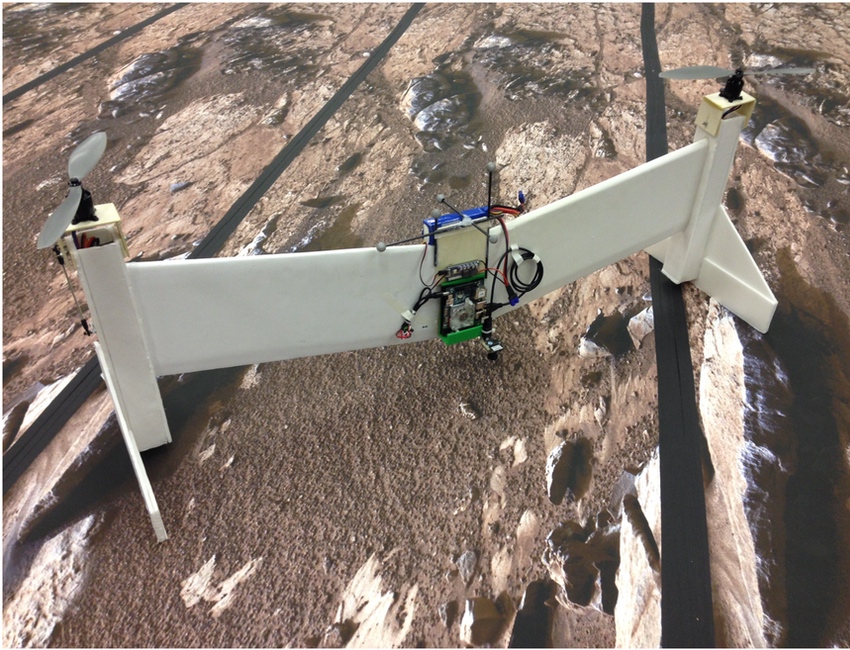
<h3 id="description">Description:</h3>

<p>Autonomy is essential for flying on Mars because it’s impossible to remotely operate a flying vehicle due to the communications delay between planets. At a high level, the vehicle must calculate its change in pose over time at a high framerate (“odometry”). Over the summer I integrated a state-of-the-art visual odometry technique into NASA’s Mars exploration UAV prototype. This technique, <a href="https://ieeexplore.ieee.org/iel7/6895053/6906581/06906584.pdf?casa_token=zgsATVirdE8AAAAA:IsjHRdt1nxnLhCYR5u3_umdRHMZf8eVvuLDP29YR-cNX4xM_Z87FwOfM2BBStD2lOm6fVaVT6gJk" target="_blank">Semi-Direct Visual Odometry</a> by Forster et al, allows for the vehicle to be localized with centimeter accuracy using only information from a camera facing the surface of the planet. Solving the localization problem paves the way for autonomous navigation and exploration. In the video above, I briefly overview the technologies I integrated to achieve camera-only localization in a simulated Mars environment. In <a href="http://www.youtube.com/watch?v=Pl9OGwPpl3k" target="_blank">this video</a>, I explain the project in detail during a technical talk at NASA. This <a href="/content/Visual_Odometry_Talk.pdf" target="_blank">PDF presentation</a> contains the latest version of the slides.</p>

<h3 id="teaser-image">Teaser Image:</h3>

<p><img src="/content/mars_flyer.jpg" alt="" /></p>]]></content><author><name>{&quot;avatar&quot;=&gt;&quot;profile.jpg&quot;, &quot;location&quot;=&gt;&quot;San Francisco, CA&quot;, &quot;email&quot;=&gt;&quot;recruit.alex.h@icloud.com&quot;}</name><email>recruit.alex.h@icloud.com</email></author><category term="visual odometry" /><category term="mars exploration" /><summary type="html"><![CDATA[Creating a visual localization system for robot localization on Mars.]]></summary></entry></feed>